
If you have downloaded a few YouTube videos with Clipzy, you have probably noticed a pattern: a low-resolution download finishes almost instantly, while Full HD or 4K shows a progress bar and takes a while longer. Nothing is wrong. That extra time is the price of getting the full-quality picture with sound, and it comes down to how YouTube itself stores video.
How YouTube Stores Video
When you watch on YouTube, the player doesn't stream one big file. For most videos, YouTube keeps the picture and the sound as separate streams: one video-only stream for every resolution (144p, 360p, 720p, 1080p, 1440p, 2160p) and a few audio-only streams. Your browser or app quietly picks one of each and plays them in sync. That is how YouTube can switch resolution mid-video without restarting the sound.
Only low resolutions, typically 360p, are still offered as a single file that already contains both picture and sound. Everything in high definition exists only as separate pieces.
What Clipzy Does for an HD Download
When you pick 1080p or higher, Clipzy has to do three things instead of one:
- Fetch the video stream at the resolution you selected. This is the largest part of the file.
- Fetch the best audio stream for that video.
- Merge them into one MP4 with the sound in sync, without reducing the quality of either.
That is exactly what the note on the results screen means: "High-quality downloads may take longer because Clipzy downloads the original video and audio separately, then merges them without reducing quality." The alternative, recording or re-encoding the video, would be faster to build but would lose detail. Merging keeps the original streams intact.
What Affects How Long It Takes
- Resolution: a 4K stream can be several times larger than the 1080p stream of the same video.
- Video length: a 20-minute video carries roughly twenty times the data of a one-minute Short at the same quality.
- Frame rate: 60 fps videos (gaming, sports) are bigger than 30 fps ones.
- Your connection: the finished file still has to travel to your device, so a slow mobile connection adds time at the end.
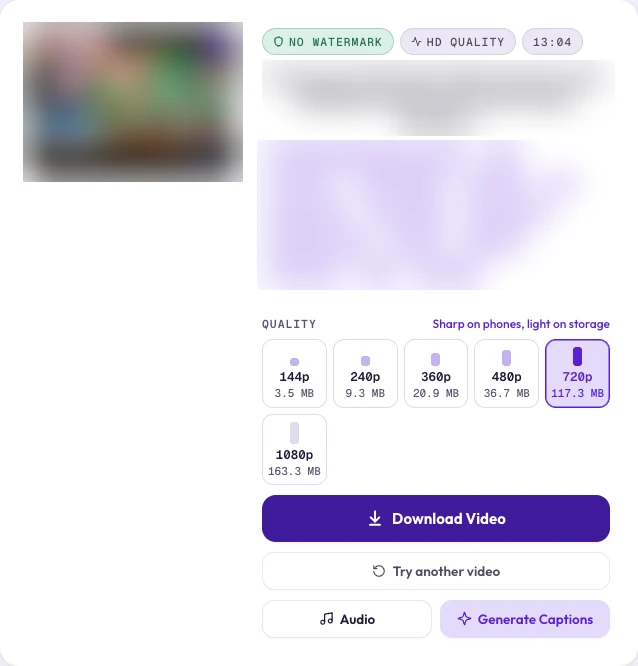
Each quality tile shows an estimated file size. If it reads several hundred MB, expect a longer wait, especially on mobile data. While the download runs, the button shows the current stage, a percentage, and an estimate of the seconds left.
How Clipzy Names Quality (and Why Shorts Say "Full HD")
Clipzy labels each option by the shorter side of the picture: Full HD (1080p), Quad HD (1440p) and Ultra HD (2160p). That matters for vertical video. A YouTube Short at 1080×1920 is labelled Full HD (1080p), the same as a horizontal 1920×1080 video, because both are 1080 pixels on their short side. It is the same picture quality, just turned on its side.
Which Quality Should You Pick?
- Watching on a phone: 720p looks sharp on almost every phone screen and downloads quickly.
- Watching on a laptop or TV: 1080p is the sweet spot between sharpness and file size.
- Editing or re-uploading your own video: pick the highest quality available. You can always export smaller later, but you can't add back detail that was never downloaded.
- Just need the sound: skip the video and use the Audio button to save an MP3 instead. It is far smaller and faster.
Tips for Faster HD Downloads
- Keep the Clipzy tab open and in front until the download finishes, especially on iPhone, where Safari can pause tabs running in the background.
- Use Wi-Fi for anything above 1080p.
- If a long 4K download fails, try 1440p or 1080p, since a smaller file is less likely to be interrupted.
Frequently Asked Questions
Does merging reduce quality?
No. The video and audio streams are combined as they are; nothing is recorded from the screen, so you get the same picture YouTube serves at that resolution.
Why is 360p so fast?
Because YouTube usually offers 360p as a single ready-made file with sound already included, so there is nothing to merge, and the file is small.
Why don't I see 4K for some videos?
Clipzy only lists qualities YouTube actually has for that video. If the creator uploaded in 1080p, 1080p is the top option; nothing can be upscaled to a real 4K.
Does it work for YouTube Shorts?
Yes. Paste the Short's link exactly as you would a normal video. The same quality options and merging apply.
Ready to try it? Open the YouTube Downloader, or read our full guide on how to download YouTube videos and Shorts. More guides live on the blog.