
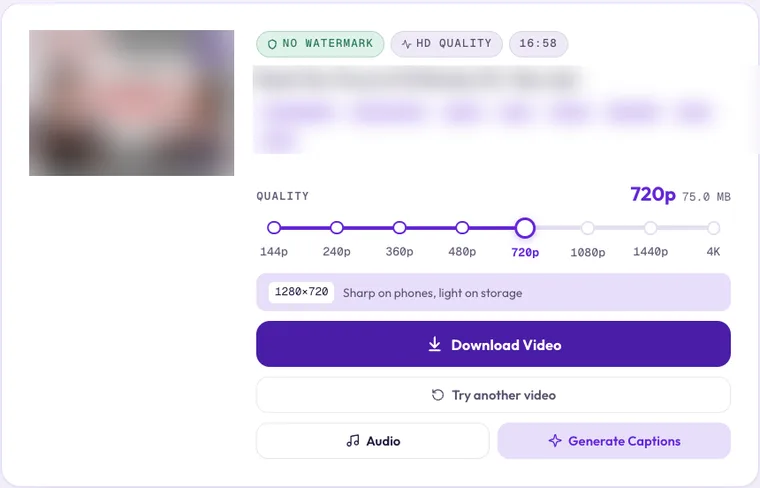
When you paste a YouTube link into Clipzy, the quality slider can show anything from 144p to 4K. Bigger is sharper, but also slower to download and heavier on your storage. The right choice depends on where you will watch the video.
What the Numbers Mean
The number is the height of the picture in pixels for a normal landscape video. "720p" means the picture is 720 pixels tall (1280×720). For vertical videos like Shorts, Clipzy shows the short side, so a 1080×1920 Short is listed as 1080p.
- 144p and 240p: very small and blurry. Only useful on a very slow connection or to save the last bit of storage.
- 360p and 480p: "standard definition". Fine for talking-head videos and lectures on a small phone screen.
- 720p (HD): sharp on any phone and most laptops. The best balance of quality and size, and Clipzy's default.
- 1080p (Full HD): crisp on laptops, monitors and TVs. A good choice if you plan to edit.
- 1440p (2K) and 2160p (4K): for large screens, cropping or zooming in an edit. Files get much bigger.
How Quality Affects File Size
Each step up roughly doubles the number of pixels, and the file grows with it. A 4K file can easily be several times the size of the same video in 1080p. You don't need to guess: Clipzy shows the file size next to each quality before you download, so you can see the difference for that exact video.
Which Quality Should You Pick?
- Watching on your phone: 720p.
- Watching on a laptop or TV: 1080p.
- Editing, cropping or reposting: 1080p, or 4K if the video has it and you need to zoom in.
- Lectures, podcasts and interviews: 360p or 480p, or skip the video and save the audio as MP3.
- Low on storage or data: 480p.
Why Isn't 4K Showing for My Video?
Clipzy can only offer the qualities the uploader gave YouTube. A video filmed in 1080p will never have a 4K option, and many older or phone-filmed videos top out at 720p.
Why Do 1080p and 4K Take Longer?
From 1080p up, YouTube sends the picture and the sound as two separate files. Clipzy downloads both and joins them into one MP4, which adds a little time. The full explanation is in why HD YouTube downloads take longer.
Frequently Asked Questions
Does a higher quality make a blurry video sharper?
No. You get the file YouTube stores at that size. If the original was filmed at low quality, a bigger option only makes a bigger file.
Can I change the quality after downloading?
Not inside Clipzy. Paste the link again and pick a different step on the slider.
Ready to download? Open the YouTube video downloader, or see how to use Clipzy on every device.